viper配置管理
12.viper配置管理
01.viper介绍
1.1 viper是什么?
- Viper (opens new window)是适用于Go应用程序的完整配置解决方案。
- 它被设计用于在应用程序中工作,并且可以处理所有类型的配置需求和格式
- viper功能
- 设置默认值
- 从
JSON、TOML、YAML、HCL、envfile和Java properties格式的配置文件读取配置信息 - 实时监控和重新读取配置文件(可选)
- 从环境变量中读取
- 从远程配置系统(etcd或Consul)读取并监控配置变化
- 从命令行参数读取配置
- 从buffer读取配置
- 显式配置值
1.2 为什么选择Viper?
- 在构建现代应用程序时,你无需担心配置文件格式;
- Viper能够为你执行下列操作:
- 查找、加载和反序列化JSON、TOML、YAML、HCL、INI、envfile和Java properties格式的配置文件。
- 提供一种机制为你的不同配置选项设置默认值。
- 提供一种机制来通过命令行参数覆盖指定选项的值。
- 提供别名系统,以便在不破坏现有代码的情况下轻松重命名参数。
- 当用户提供了与默认值相同的命令行或配置文件时,可以很容易地分辨出它们之间的区别。
Viper会按照下面的优先,每个项目的优先级都高于它下面的项目- 显示调用
Set设置值 - 命令行参数(flag)
- 环境变量
- 配置文件
- key/value存储
- 默认值
- 显示调用
- 重要: 目前Viper配置的键(Key)是
大小写不敏感的
1.3 viper安装
1 | go get github.com/spf13/viper |
02.viper设置配置
2.1 建立默认值
- 一个好的配置系统应该支持默认值。
- 键不需要默认值,但如果没有通过配置文件、环境变量、远程配置或命令行标志(flag)设置键,则默认值非常有用。
- 例如:
1 | viper.SetDefault("ContentDir", "content") |
2.2 读取配置文件
- Viper需要最少知道在哪里查找配置文件的配置。
- Viper支持
JSON、TOML、YAML、HCL、envfile和Java properties格式的配置文件。 - Viper可以搜索多个路径,但目前单个Viper实例只支持单个配置文件。
1 | viper.SetConfigFile("./config.yaml") // 指定配置文件路径 |
2.3 写入配置文件
- 从配置文件中读取配置文件是有用的,但是有时你想要存储在运行时所做的所有修改。
- 为此,可以使用下面一组命令,每个命令都有自己的用途
1 | viper.WriteConfig() // 将当前配置写入“viper.AddConfigPath()”和“viper.SetConfigName”设置的预定义路径 |
2.4 监控并重新读取配置文件
- 确保在调用
WatchConfig()之前添加了所有的配置路径。
1 | viper.WatchConfig() |
2.4 覆盖设置
- 这些可能来自命令行标志,也可能来自你自己的应用程序逻辑。
1 | viper.Set("Verbose", true) |
03.viper读取配置
3.1 几种访问值的方法
- 在Viper中,有几种方法可以根据值的类型获取值
Get(key string) : interface{}GetBool(key string) : boolGetFloat64(key string) : float64GetInt(key string) : intGetIntSlice(key string) : []intGetString(key string) : stringGetStringMap(key string) : map[string]interface{}GetStringMapString(key string) : map[string]stringGetStringSlice(key string) : []stringGetTime(key string) : time.TimeGetDuration(key string) : time.DurationIsSet(key string) : boolAllSettings() : map[string]interface{}
例如:
1 | viper.GetString("logfile") // 不区分大小写的设置和获取 |
3.2 访问嵌套的键
- 问器方法也接受深度嵌套键的格式化路径
- 例如,如果加载下面的JSON文件
1 | { |
- Viper可以通过传入
.分隔的路径来访问嵌套字段:
1 | GetString("datastore.metric.host") // (返回 "127.0.0.1") |
3.3 提取子树
- 例如,
viper实例现在代表了以下配置:
1 | app: |
- 执行后:
1 | subv := viper.Sub("app.cache1") |
subv现在就代表:
1 | max-items: 100 |
- 假设我们现在有这么一个函数:
1 | func NewCache(cfg *Viper) *Cache {...} |
- 它基于
subv格式的配置信息创建缓存。现在,可以轻松地分别创建这两个缓存,如下所示:
1 | cfg1 := viper.Sub("app.cache1") |
3.4 反序列化
你还可以选择将所有或特定的值解析到结构体、map等。
有两种方法可以做到这一点:
Unmarshal(rawVal interface{}) : errorUnmarshalKey(key string, rawVal interface{}) : error
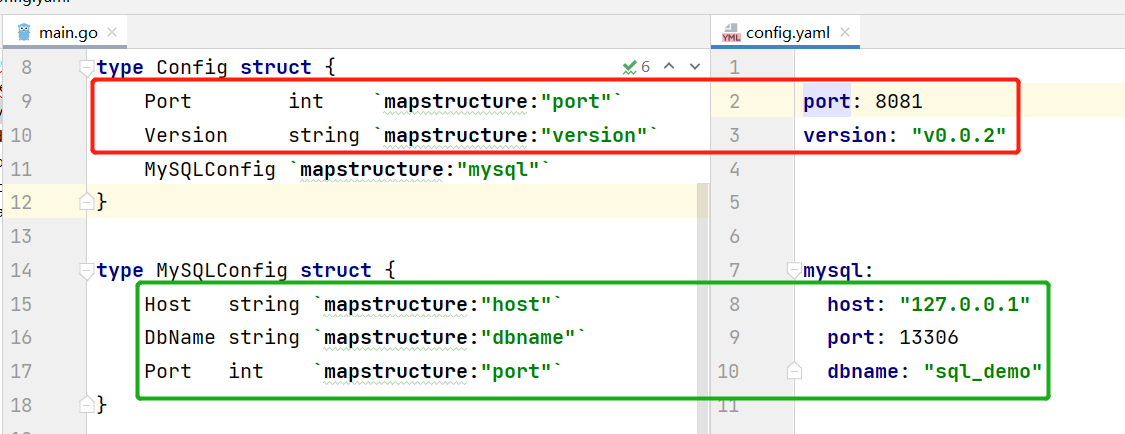
main.go
1 | package main |
- config.yaml
1 | port: 8081 |
04.使用Viper示例
- 目录结构

4.1 ./conf/config.yaml
1 | port: 8123 |
4.2 gin中使用viper案例
- 这里用一个demo演示如何在gin框架搭建的web项目中使用
viper,使用viper加载配置文件中的信息 - 并在代码中直接使用
viper.GetXXX()方法获取对应的配置值。
1 | package main |
4.3 结构体变量保存配置
1 | package main |
本博客所有文章除特别声明外,均采用 CC BY-NC-SA 4.0 许可协议。转载请注明来源 Deng的博客!
相关推荐

2022-06-17
Makefile
16.Makefile01.介绍1.1 make介绍 make是一个构建自动化工具,会在当前目录下寻找Makefile或makefile文件 如果存在相应的文件,它就会依据其中定义好的规则完成构建任务。 1.2 Makefile介绍 借助Makefile我们在编译过程中不再需要每次手动输入编译的命令和编译的参数,可以极大简化项目编译过程。 我们可以把Makefile简单理解为它定义了一个项目文件的编译规则。 借助Makefile我们在编译过程中不再需要每次手动输入编译的命令和编译的参数,可以极大简化项目编译过程。 同时使用Makefile也可以在项目中确定具体的编译规则和流程,很多开源项目中都会定义Makefile文件。 1.3 win10安装make MinGW下载网页:http://sourceforge.net/projects/mingw/files/latest/download?source=files 右击计算机->属性->高级系统设置->环境变量,在系统变量中找到PATH 将MinGW安装目录里的bin文件夹的地址添加到PATH里面。 打开M...
2022-06-01
net/http
08.net/http01.net/http(GET) Go语言内置的net/http包十分的优秀,提供了HTTP客户端和服务端的实现。 1.1 无参GET 使用net/http包编写一个简单的发送HTTP请求的Client端 12345678910111213141516171819202122package mainimport ( "fmt" "io/ioutil" "net/http")func main() { resp, err := http.Get("https://www.baidu.com/") if err != nil { fmt.Println("get failed, err:", err) return } defer resp.Body.Close() body, err := ioutil.ReadAll(resp.Body) if err != nil { ...
2022-06-11
gRPC
13.gRPC01.gRPC基础1.1 RPC是什么 在分布式计算,远程过程调用(英语:Remote Procedure Call,缩写为 RPC)是一个计算机通信协议。 该协议允许运行于一台计算机的程序调用另一个地址空间(通常为一个开放网络的一台计算机)的子程序 而程序员就像调用本地程序一样,无需额外地为这个交互作用编程(无需关注细节)。 RPC是一种服务器-客户端(Client/Server)模式,经典实现是一个通过发送请求-接受回应进行信息交互的系统。 1.2 gRPC是什么 gRPC是一种现代化开源的高性能RPC框架,能够运行于任意环境之中。 最初由谷歌进行开发,它使用HTTP/2作为传输协议。 在gRPC里,客户端可以像调用本地方法一样直接调用其他机器上的服务端应用程序的方法,帮助你更容易创建分布式应用程序和服务。 与许多RPC系统一样,gRPC是基于定义一个服务,指定一个可以远程调用的带有参数和返回类型的的方法。 在服务端程序中实现这个接口并且运行gRPC服务处理客户端调用。 在客户端,有一个stub提供和服务端相同的方 1.3 为什么要用gR...
2022-06-15
go-wrk
15.go-wrk压测01.压测介绍1.1 压测作用 在项目正式上线之前,我们通常需要通过压测来评估当前系统能够支撑的请求量、排查可能存在的隐藏bug 同时了解了程序的实际处理能力能够帮我们更好的匹配项目的实际需求,节约资源成本。 1.2 压测相关术语 响应时间(RT) :指系统对请求作出响应的时间. 吞吐量(Throughput) :指系统在单位时间内处理请求的数量 QPS每秒查询率(Query Per Second) :“每秒查询率”,是一台服务器每秒能够响应的查询次数 是对一个特定的查询服务器在规定时间内所处理流量多少的衡量标准。 TPS(TransactionPerSecond):每秒钟系统能够处理的交易或事务的数量 并发连接数:某个时刻服务器所接受的请求总数 02.压力测试工具2.1 ab ab全称Apache Bench,是Apache自带的性能测试工具。 使用这个工具,只须指定同时连接数、请求数以及URL,即可测试网站或网站程序的性能。 通过ab发送请求模拟多个访问者同时对某一URL地址进行访问,可以得到每秒传送字节数、每秒处理请求数、每请求处理时间等统计数...
2022-06-23
regexp2
21.regexp201.regexp2 Regexp2:https://blog.csdn.net/dianxin113/article/details/118769094 GitHub:https://github.com/dlclark/regexp2 12345678910111213141516171819202122232425262728293031323334353637383940package mainimport ( "fmt" "github.com/dlclark/regexp2")func Regexp2GroupMatch(m *regexp2.Match, re *regexp2.Regexp) [][]string { var matches [][]string for m != nil { var ret []string gps := m.Groups() for index, g := range gps { if index == 0 { ...
2022-05-31
Strconv
07.Strconv01.string与int类型转换1.0 strconv包介绍 strconv包实现了基本数据类型与其字符串表示的转换 主要有以下常用函数: Atoi()、Itia()、parse系列、format系列、append系列。 更多函数请查看官方文档 (opens new window)。 1.1 Atoi()转int Atoi()函数用于将字符串类型的整数转换为int类型,函数签名如下。 123456789101112131415package mainimport ( "fmt" "strconv")func main() { s1 := "100" i1, err := strconv.Atoi(s1) if err != nil { fmt.Println("can't convert to int") } else { fmt.Printf("type:%T v...